# WeChat CLI
**Query your local WeChat data from the command line.**
[](https://www.npmjs.com/package/@canghe_ai/wechat-cli)
[](https://opensource.org/licenses/Apache-2.0)
[](https://github.com/freestylefly/wechat-cli)
Chat history · Contacts · Sessions · Favorites · Statistics · Export
[中文文档](README_CN.md)
---
## ✨ Highlights
- **🚀 Zero-config install** — `npm install -g` and you're done, no Python needed
- **📦 11 commands** — sessions, history, search, contacts, members, stats, export, favorites, unread, new-messages, init
- **🤖 AI-first** — JSON output by default, designed for LLM agent tool calls
- **🔒 Fully local** — on-the-fly SQLCipher decryption, data never leaves your machine
- **📊 Rich analytics** — top senders, message type breakdown, 24-hour activity charts
- **📝 Flexible export** — Markdown or plain text, with time range filtering
---
## 📥 Installation (For Humans)
AI Agents — skip ahead to "Installation (For AI Agents)" below.
### npm (Recommended)
```bash
npm install -g @canghe_ai/wechat-cli
```
> Currently ships a **macOS arm64** binary. Other platforms can use the pip method below. PRs with additional platform binaries are welcome.
**Update to the latest version:**
```bash
npm update -g @canghe_ai/wechat-cli
```
### pip
```bash
pip install wechat-cli
```
Requires Python >= 3.10.
### From Source
```bash
git clone https://github.com/freestylefly/wechat-cli.git
cd wechat-cli
pip install -e .
```
---
## 📥 Installation (For AI Agents)
Simply paste the following prompt into Claude Code, OpenClaw, or any AI coding agent:
```bash
帮我配置并安装:npm install -g @canghe_ai/wechat-cli
```
For example, in Claude Code:
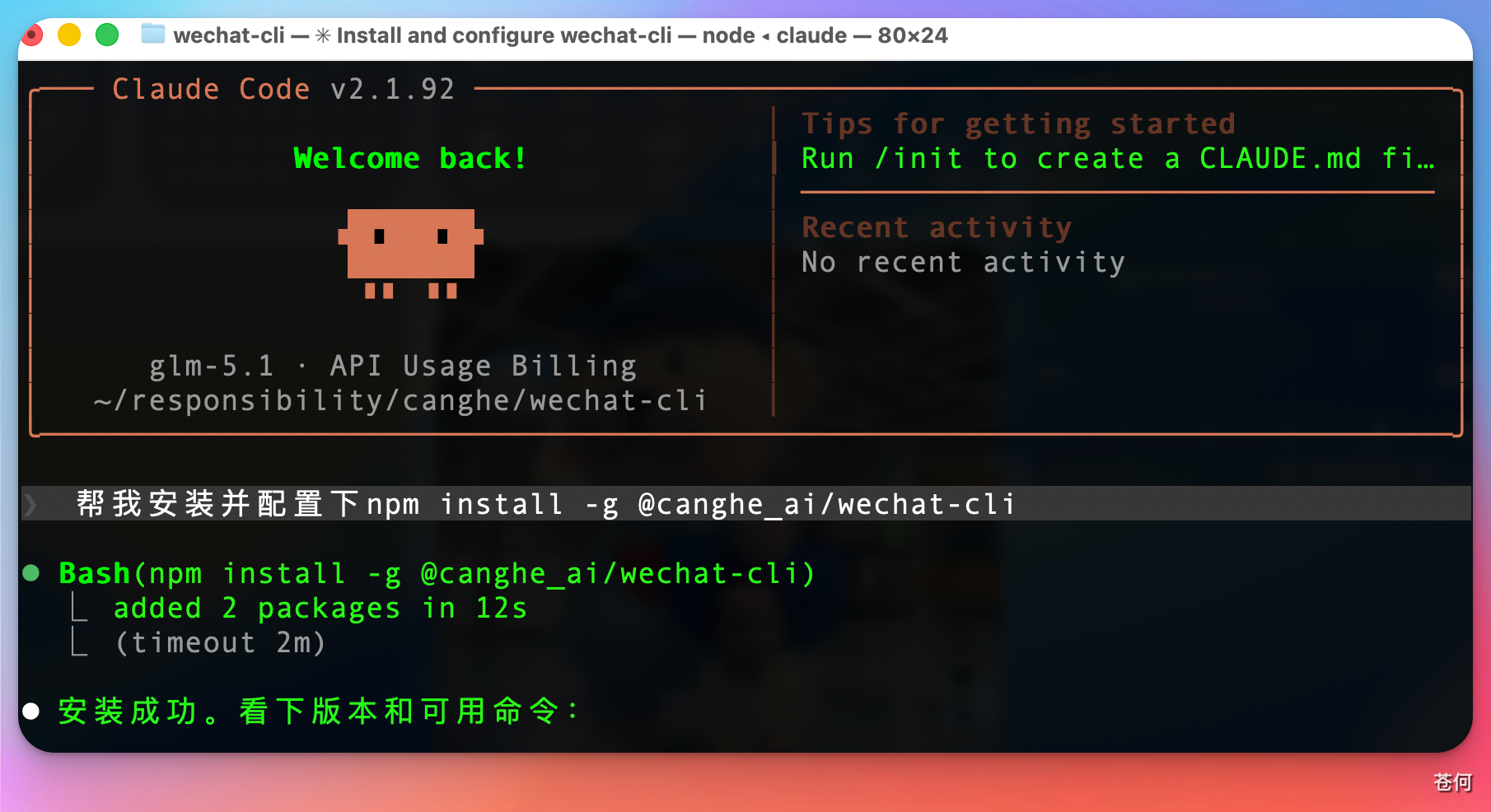
Note: Make sure you have Node.js installed first. You can ask your agent to set it up if needed.
---
## 🚀 Quick Start
### Step 1 — Initialize
Make sure WeChat is running, then:
```bash
# macOS/Linux: may need sudo for memory scanning
sudo wechat-cli init
# Windows: run in a terminal with sufficient privileges
wechat-cli init
```
This auto-detects your WeChat data directory, extracts encryption keys, and saves config to `~/.wechat-cli/`.

On macOS, you'll need to run the `sudo` command and enter your password:
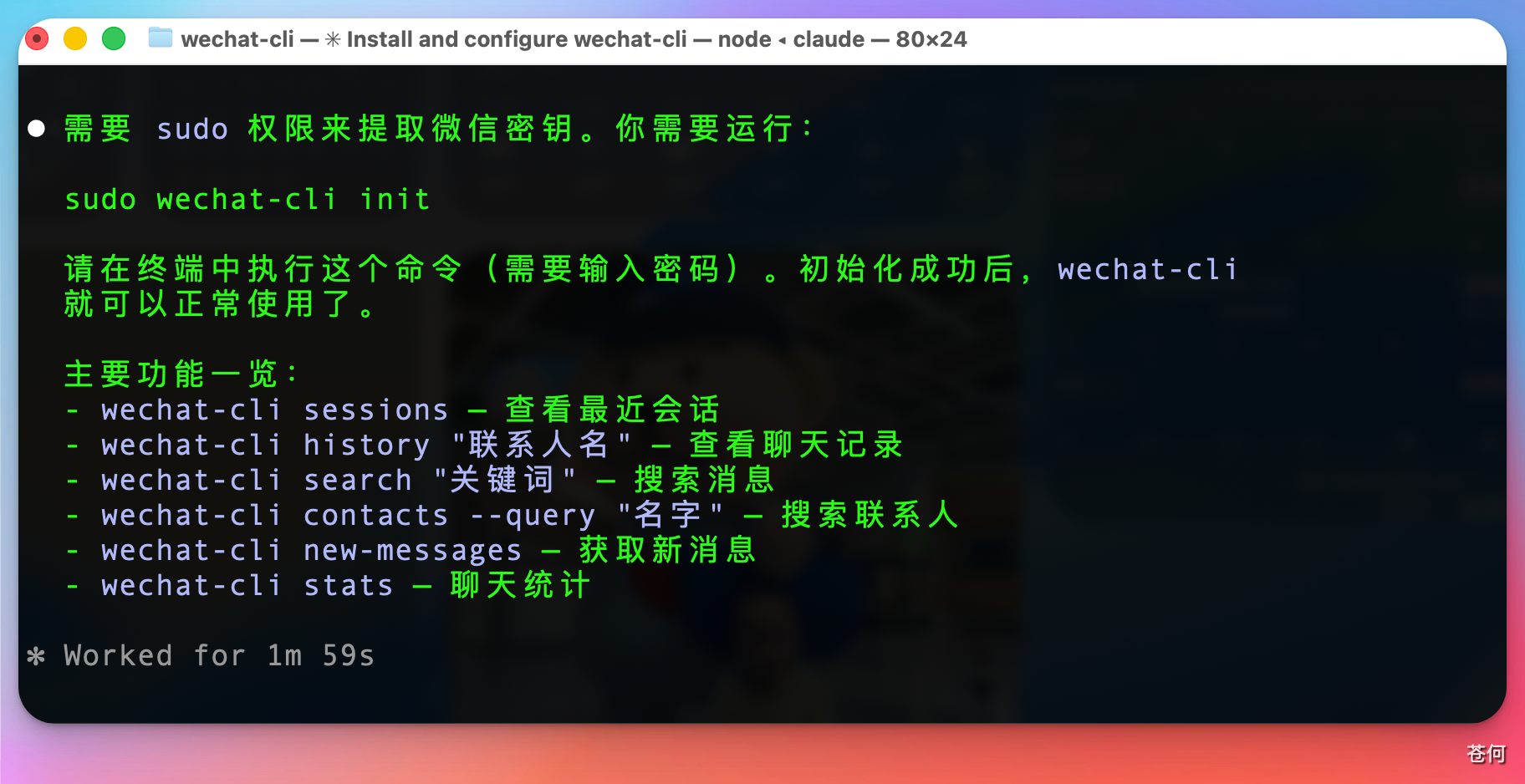
If you have multiple WeChat accounts logged in locally, you'll be prompted to choose one. Select the account you're currently using (the default is the first one):
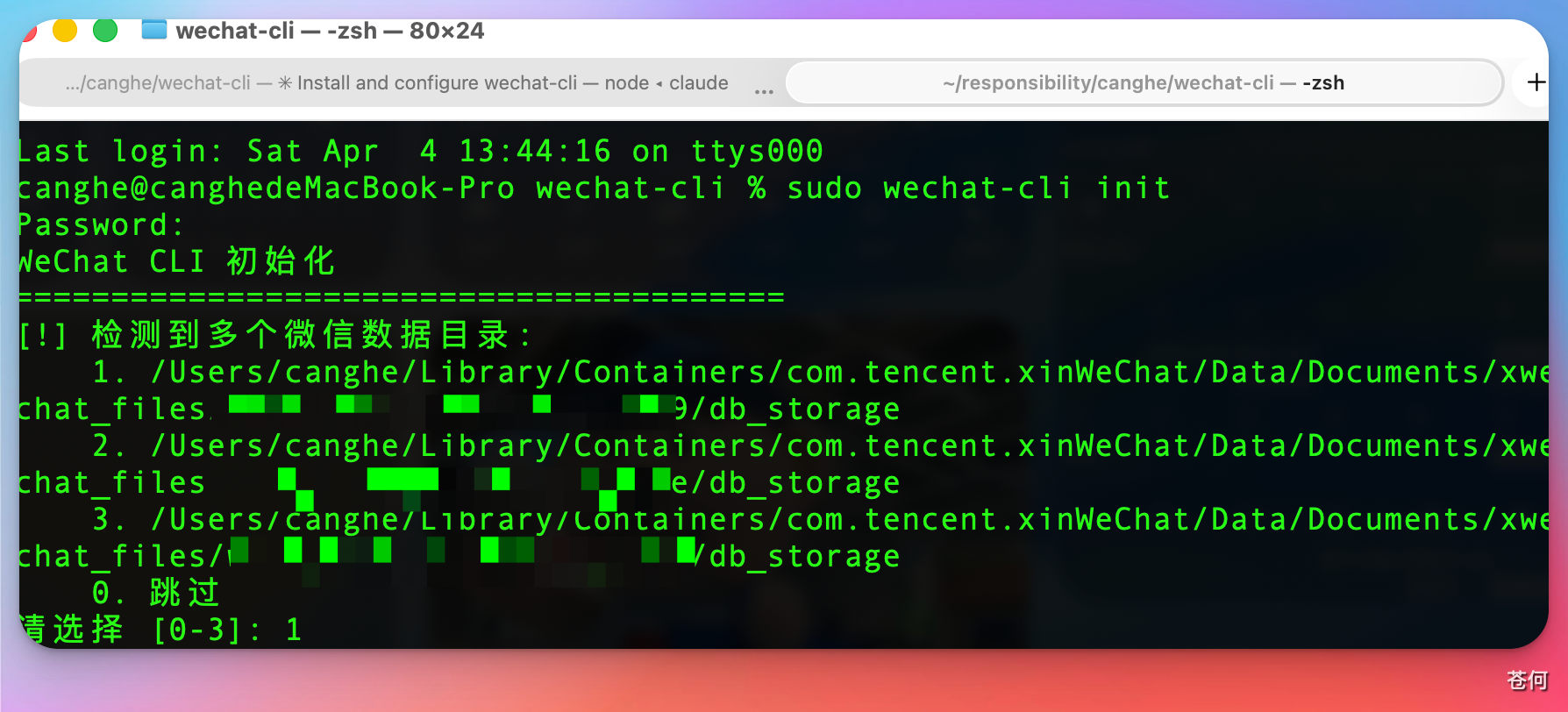
If you're unsure which WeChat account is currently active, navigate to the data folder and sort by modification date to find out:

#### macOS: Grant Full Disk Access to Terminal
Before running `init`, make sure your terminal app has **Full Disk Access**:
1. Open **System Settings → Privacy & Security → Full Disk Access**
2. Add your terminal app (e.g. Terminal, iTerm2, or the terminal in your IDE)
3. Restart the terminal after enabling
Without this permission, the tool cannot access WeChat's data directory and key extraction will fail.
#### macOS: `task_for_pid failed` Error
On some macOS systems, `init` may fail with `task_for_pid failed` even when running with `sudo`. This is due to macOS security restrictions on process memory access.
**WeChat CLI will automatically attempt to fix this** by re-signing WeChat with the required entitlement (original entitlements are preserved). Just follow the on-screen instructions:
1. The tool will re-sign WeChat automatically
2. Quit WeChat completely (not just minimize)
3. Reopen WeChat and log in
4. Run `sudo wechat-cli init` again
If auto re-signing fails, you can do it manually:
```bash
# Quit WeChat first, then:
sudo codesign --force --sign - --entitlements /dev/stdin /Applications/WeChat.app <<'EOF'
com.apple.security.get-task-allow
EOF
```
> **Heads up:** Re-signing WeChat is safe and will **not** cause account issues or bans. However, it may affect WeChat's auto-update mechanism. If you notice any feature not working properly, or want to update WeChat to the latest version, simply re-download and reinstall WeChat from the [official website](https://mac.weixin.qq.com/) — no need to re-run `init`, your existing config and keys will continue to work.
### Step 2 — Use It
```bash
wechat-cli sessions # Recent chats
wechat-cli history "Alice" --limit 20 # Chat messages
wechat-cli search "deadline" --chat "Team" # Search messages
```
---
## 🤖 Using with AI Agents
WeChat CLI is designed as an AI agent tool. All commands output structured JSON by default.
### Claude Code
Add to your project's `CLAUDE.md`:
```markdown
## WeChat CLI
You can use `wechat-cli` to query my local WeChat data.
Common commands:
- `wechat-cli sessions --limit 10` — list recent chats
- `wechat-cli history "NAME" --limit 20 --format text` — read chat history
- `wechat-cli search "KEYWORD" --chat "CHAT_NAME"` — search messages
- `wechat-cli contacts --query "NAME"` — search contacts
- `wechat-cli unread` — show unread sessions
- `wechat-cli new-messages` — get messages since last check
- `wechat-cli members "GROUP"` — list group members
- `wechat-cli stats "CHAT" --format text` — chat statistics
```
Then in conversation you can ask Claude things like:
- "Check my unread WeChat messages"
- "Search for messages about the project deadline in the Team group"
- "Who sent the most messages in the AI group this week?"
### OpenClaw / MCP Integration
WeChat CLI works with any AI tool that can execute shell commands:
```bash
# Get recent conversations
wechat-cli sessions --limit 5
# Read specific chat
wechat-cli history "Alice" --limit 30 --format text
# Search with filters
wechat-cli search "report" --type file --limit 10
# Monitor for new messages (great for cron/automation)
wechat-cli new-messages --format text
```
---
## 📖 Command Reference
### `sessions` — Recent Chats
```bash
wechat-cli sessions # Last 20 sessions
wechat-cli sessions --limit 10 # Last 10
wechat-cli sessions --format text # Human-readable
```
### `history` — Chat Messages
```bash
wechat-cli history "Alice" # Last 50 messages
wechat-cli history "Alice" --limit 100 --offset 50
wechat-cli history "Team" --start-time "2026-04-01" --end-time "2026-04-03"
wechat-cli history "Alice" --type link # Only links
wechat-cli history "Alice" --format text
```
**Options:** `--limit`, `--offset`, `--start-time`, `--end-time`, `--type`, `--format`
### `search` — Search Messages
```bash
wechat-cli search "hello" # Global search
wechat-cli search "hello" --chat "Alice" # In specific chat
wechat-cli search "meeting" --chat "TeamA" --chat "TeamB" # Multiple chats
wechat-cli search "report" --type file # Only files
```
**Options:** `--chat` (repeatable), `--start-time`, `--end-time`, `--limit`, `--offset`, `--type`, `--format`
### `contacts` — Contact Search & Details
```bash
wechat-cli contacts --query "Li" # Search contacts
wechat-cli contacts --detail "Alice" # Contact details
wechat-cli contacts --detail "wxid_xxx" # By WeChat ID
```
Returns: nickname, remark, WeChat ID, bio, avatar URL, account type.
### `members` — Group Members
```bash
wechat-cli members "Team Group" # All members (JSON)
wechat-cli members "Team Group" --format text
```
### `stats` — Chat Statistics
```bash
wechat-cli stats "Team Group"
wechat-cli stats "Alice" --start-time "2026-04-01" --end-time "2026-04-03"
wechat-cli stats "Team Group" --format text
```
Returns: total messages, type breakdown, top 10 senders, 24-hour activity distribution.
### `export` — Export Conversations
```bash
wechat-cli export "Alice" --format markdown # To stdout
wechat-cli export "Alice" --format txt --output chat.txt # To file
wechat-cli export "Team" --start-time "2026-04-01" --limit 1000
```
**Options:** `--format markdown|txt`, `--output`, `--start-time`, `--end-time`, `--limit`
### `favorites` — WeChat Bookmarks
```bash
wechat-cli favorites # Recent bookmarks
wechat-cli favorites --type article # Articles only
wechat-cli favorites --query "machine learning" # Search
```
**Types:** text, image, article, card, video
### `unread` — Unread Sessions
```bash
wechat-cli unread # All unread sessions
wechat-cli unread --limit 10 --format text
```
### `new-messages` — Incremental New Messages
```bash
wechat-cli new-messages # First: return unread + save state
wechat-cli new-messages # Subsequent: only new since last call
```
State saved at `~/.wechat-cli/last_check.json`. Delete to reset.
---
## 🔍 Message Type Filter
The `--type` option (on `history` and `search`):
| Value | Description |
|-------|-------------|
| `text` | Text messages |
| `image` | Images |
| `voice` | Voice messages |
| `video` | Videos |
| `sticker` | Stickers/emojis |
| `location` | Location shares |
| `link` | Links and app messages |
| `file` | File attachments |
| `call` | Voice/video calls |
| `system` | System messages |
---
## 💻 System Requirements
- **macOS** ≥ 26.3.1
- **WeChat for Mac** ≤ 4.1.8.100
> Older macOS versions or newer WeChat versions may not be compatible.
---
## 🖥️ Platform Support
| Platform | Status | Notes |
|----------|--------|-------|
| macOS (Apple Silicon) | ✅ Supported | Bundled arm64 binary |
| macOS (Intel) | ✅ Supported | x86_64 binary needed |
| Windows | ✅ Supported | Reads Weixin.exe process memory |
| Linux | ✅ Supported | Reads /proc/pid/mem, requires root |
---
## 🔧 How It Works
WeChat stores chat data in SQLCipher-encrypted SQLite databases locally. WeChat CLI:
1. **Extracts keys** — scans WeChat process memory for encryption keys (`init`)
2. **Decrypts on-the-fly** — transparent page-level AES-256-CBC decryption with caching
3. **Queries locally** — all data stays on your machine, no network access
---
## 📄 License
[Apache License 2.0](LICENSE)
---
## ⚖️ Disclaimer
This project is a local data query tool for personal use only. Please note:
- **Read-only** — this tool only reads locally stored data, it does not send, modify, or delete any messages
- **No cloud transmission** — all data stays on your local machine, nothing is uploaded to any server
- **No WeChat ecosystem disruption** — this tool does not interfere with WeChat's normal operation, does not automate any actions, and does not violate WeChat's Terms of Service
- **Use at your own risk** — this project is for personal learning and research purposes only. Users are responsible for ensuring compliance with local laws and regulations
---
## 🙏 Acknowledgements
This project is built on top of [wechat-decrypt](https://github.com/ylytdeng/wechat-decrypt), which provides the core WeChat database decryption and data parsing capabilities.
---
## ⭐ Star History
[](https://star-history.com/#freestylefly/wechat-cli&Date)