# WeChat CLI
**命令行查询本地微信数据,专为 AI 集成设计。**
[](https://www.npmjs.com/package/@canghe_ai/wechat-cli)
[](https://opensource.org/licenses/Apache-2.0)
[](https://github.com/freestylefly/wechat-cli)
聊天记录 · 联系人 · 会话 · 收藏 · 统计 · 导出
[English](README.md)
---
## ✨ 功能亮点
- **🚀 开箱即用** — `npm install -g` 一键安装,无需 Python
- **📦 11 个命令** — sessions、history、search、contacts、members、stats、export、favorites、unread、new-messages、init
- **🤖 AI 优先** — 默认 JSON 输出,专为 LLM Agent 工具调用设计
- **🔒 全程本地** — SQLCipher 即时解密,数据不出本机
- **📊 丰富统计** — 发言排行、消息类型分布、24 小时活跃图
- **📝 灵活导出** — Markdown 或纯文本,支持时间范围过滤
---
## 📥 安装(给人类看)
AI Agent 请直接移步到“安装(给 Agent 看)”
### npm(推荐)
```bash
npm install -g @canghe_ai/wechat-cli
```
> 目前提供 **macOS arm64** 二进制。其他平台可使用下方 pip 安装。欢迎提交其他平台二进制 PR。
**更新到最新版本:**
```bash
npm update -g @canghe_ai/wechat-cli
```
### pip
```bash
pip install wechat-cli
```
需要 Python >= 3.10。
### 从源码安装
```bash
git clone https://github.com/freestylefly/wechat-cli.git
cd wechat-cli
pip install -e .
```
---
## 📥 安装(给 Agent 看)
直接将在你的 Claude Code 或者 OpenClaw 中输入以下提示即可:
```bash
帮我配置并安装:npm install -g @canghe_ai/wechat-cli
```
比如在 Claude Code 中输入:
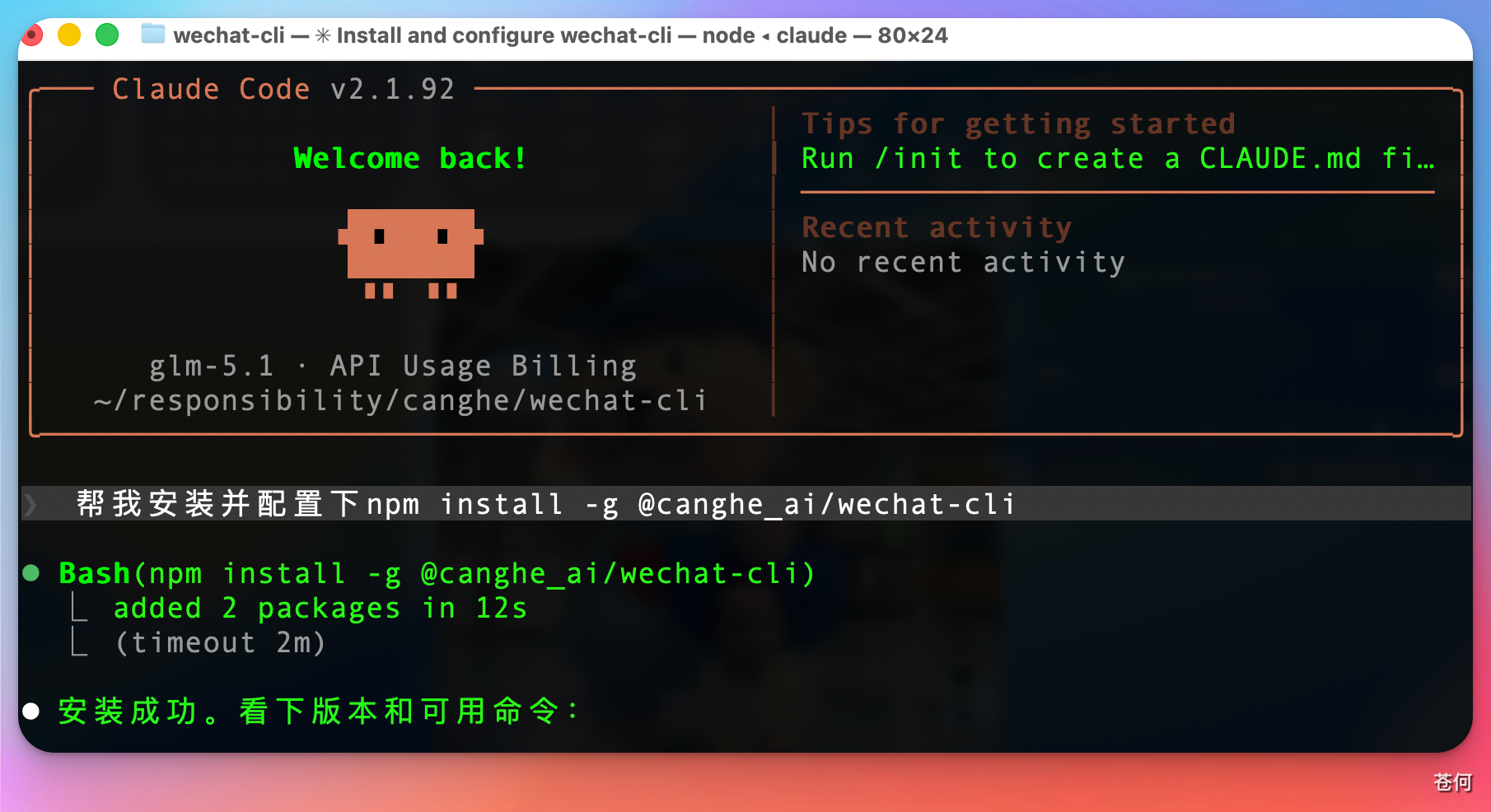
注意:请先确保有 node.js 环境。没雨可以让你的 cc 安装环境。
## 🚀 快速开始
### 第一步 — 初始化
确保微信正在运行,然后:
```bash
# macOS/Linux: 可能需要 sudo 权限
sudo wechat-cli init
# Windows: 在有足够权限的终端中运行
wechat-cli init
```
这一步会自动检测微信数据目录、提取加密密钥,并保存到 `~/.wechat-cli/`。

如果是 mac,需要执行 sudo 命令,然后需要输入密码:
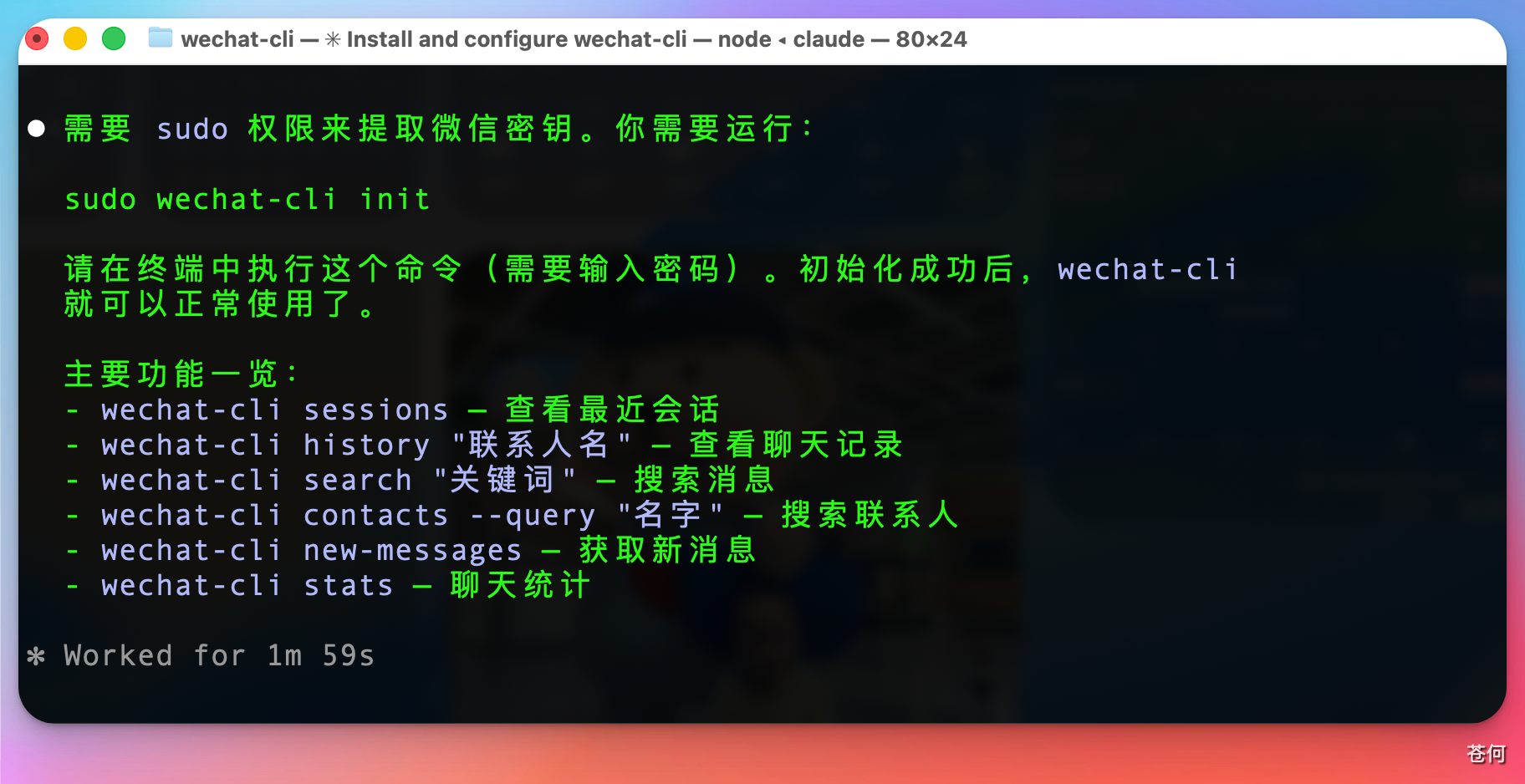
特别注意,如果你本地有登录微信多个账号,会有多份数据需要你做选择,选择你当前登录的微信账号(默认是第一个):
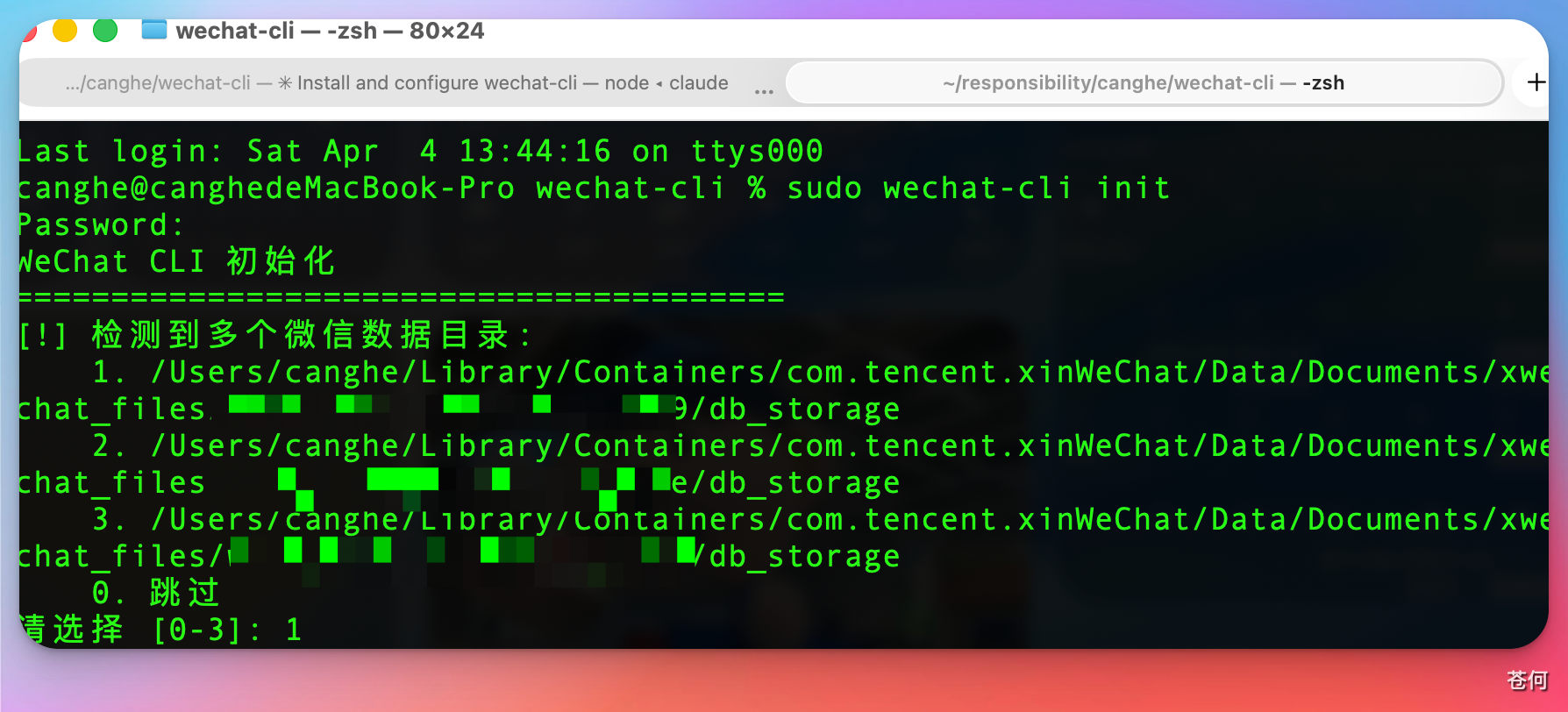
这里不确定自己现在的登录微信号,可以找到该文件夹,然后按照修改时间排序,你就可以看到了。()

#### macOS:提前开启终端的完全磁盘访问权限
在执行 `init` 之前,请确保已为终端开启**完全磁盘访问权限**:
1. 打开 **系统设置 → 隐私与安全性 → 完全磁盘访问权限**
2. 添加你使用的终端应用(如 Terminal、iTerm2 或 IDE 内置终端)
3. 开启后重启终端
未开启此权限会导致工具无法访问微信数据目录,密钥提取将失败。
#### macOS 遇到 `task_for_pid failed` 错误?
在某些 macOS 系统上,即使使用了 `sudo`,`init` 也可能报 `task_for_pid failed`。这是 macOS 的安全策略限制了进程内存访问。
**WeChat CLI 会自动尝试修复此问题**——对微信重新签名以获取必要权限(会保留微信原有权限)。按提示操作即可:
1. 工具会自动对微信重新签名
2. 完全退出微信(不是最小化)
3. 重新打开微信并登录
4. 再次执行 `sudo wechat-cli init`
如果自动签名失败,可以手动执行:
```bash
# 先退出微信,然后:
sudo codesign --force --sign - --entitlements /dev/stdin /Applications/WeChat.app <<'EOF'
com.apple.security.get-task-allow
EOF
```
> **温馨提示:** 重新签名是安全的,**不会**导致封号或账号异常。但可能影响微信的部分功能或自动更新。如果发现任何功能异常(如搜一搜无法使用),或想更新到微信最新版,直接从[微信官网](https://mac.weixin.qq.com/)重新下载安装即可,**无需重新执行 init**,已有的配置和密钥不受影响。
### 第二步 — 开始使用
```bash
wechat-cli sessions # 最近会话
wechat-cli history "张三" --limit 20 # 聊天记录
wechat-cli search "截止日期" --chat "项目组" # 搜索消息
```
---
## 🤖 AI 工具集成
WeChat CLI 专为 AI Agent 设计,所有命令默认输出结构化 JSON。
### Claude Code
在项目的 `CLAUDE.md` 中添加:
```markdown
## WeChat CLI
你可以使用 `wechat-cli` 查询我的本地微信数据。
常用命令:
- `wechat-cli sessions --limit 10` — 列出最近会话
- `wechat-cli history "名称" --limit 20 --format text` — 读取聊天记录
- `wechat-cli search "关键词" --chat "聊天名"` — 搜索消息
- `wechat-cli contacts --query "名称"` — 搜索联系人
- `wechat-cli unread` — 显示未读会话
- `wechat-cli new-messages` — 获取上次以来的新消息
- `wechat-cli members "群名"` — 列出群成员
- `wechat-cli stats "聊天名" --format text` — 聊天统计
```
然后在对话中可以直接问 Claude:
- "帮我看看微信有没有未读消息"
- "在项目群里搜索关于截止日期的消息"
- "看看这周 AI 群里谁发言最多?"
### OpenClaw / MCP 集成
WeChat CLI 兼容任何能执行 shell 命令的 AI 工具:
```bash
# 获取最近会话
wechat-cli sessions --limit 5
# 读取指定聊天
wechat-cli history "张三" --limit 30 --format text
# 带过滤条件搜索
wechat-cli search "报告" --type file --limit 10
# 监控新消息(适合定时任务)
wechat-cli new-messages --format text
```
---
## 📖 命令一览
### `sessions` — 最近会话
```bash
wechat-cli sessions # 最近 20 个会话
wechat-cli sessions --limit 10 # 最近 10 个
wechat-cli sessions --format text # 纯文本输出
```
### `history` — 聊天记录
```bash
wechat-cli history "张三" # 最近 50 条消息
wechat-cli history "张三" --limit 100 --offset 50
wechat-cli history "交流群" --start-time "2026-04-01" --end-time "2026-04-03"
wechat-cli history "张三" --type link # 只看链接
wechat-cli history "张三" --format text
```
**选项:** `--limit`、`--offset`、`--start-time`、`--end-time`、`--type`、`--format`
### `search` — 搜索消息
```bash
wechat-cli search "Claude" # 全局搜索
wechat-cli search "Claude" --chat "交流群" # 指定聊天搜索
wechat-cli search "开会" --chat "群A" --chat "群B" # 多个聊天
wechat-cli search "报告" --type file # 只搜文件
```
**选项:** `--chat`(可多次指定)、`--start-time`、`--end-time`、`--limit`、`--offset`、`--type`、`--format`
### `contacts` — 联系人搜索与详情
```bash
wechat-cli contacts --query "李" # 搜索联系人
wechat-cli contacts --detail "张三" # 查看详情
wechat-cli contacts --detail "wxid_xxx" # 通过 wxid 查看
```
详情包括:昵称、备注、微信号、个性签名、头像 URL、账号类型。
### `members` — 群成员列表
```bash
wechat-cli members "AI交流群" # 成员列表
wechat-cli members "AI交流群" --format text
```
### `stats` — 聊天统计
```bash
wechat-cli stats "AI交流群"
wechat-cli stats "张三" --start-time "2026-04-01" --end-time "2026-04-03"
wechat-cli stats "AI交流群" --format text
```
返回:消息总数、类型分布、发言 Top 10、24 小时活跃分布。
### `export` — 导出聊天记录
```bash
wechat-cli export "张三" --format markdown # 输出到 stdout
wechat-cli export "张三" --format txt --output chat.txt # 输出到文件
wechat-cli export "群聊" --start-time "2026-04-01" --limit 1000
```
**选项:** `--format markdown|txt`、`--output`、`--start-time`、`--end-time`、`--limit`
### `favorites` — 微信收藏
```bash
wechat-cli favorites # 最近收藏
wechat-cli favorites --type article # 只看文章
wechat-cli favorites --query "计算机网络" # 搜索收藏
```
**类型:** text、image、article、card、video
### `unread` — 未读会话
```bash
wechat-cli unread # 所有未读会话
wechat-cli unread --limit 10 --format text
```
### `new-messages` — 增量新消息
```bash
wechat-cli new-messages # 首次: 返回未读消息 + 保存状态
wechat-cli new-messages # 后续: 仅返回上次以来的新消息
```
状态保存在 `~/.wechat-cli/last_check.json`,删除此文件可重置。
---
## 🔍 消息类型过滤
`--type` 选项(适用于 `history` 和 `search`):
| 值 | 说明 |
|---|------|
| `text` | 文本消息 |
| `image` | 图片 |
| `voice` | 语音 |
| `video` | 视频 |
| `sticker` | 表情 |
| `location` | 位置 |
| `link` | 链接/应用消息 |
| `file` | 文件 |
| `call` | 音视频通话 |
| `system` | 系统消息 |
---
## 💻 系统要求
- **macOS** ≥ 26.3.1
- **微信 Mac 版** ≤ 4.1.8.100
> macOS 老版本或更新的微信版本可能不兼容。
---
## 🖥️ 平台支持
| 平台 | 状态 | 说明 |
|------|------|------|
| macOS (Apple Silicon) | ✅ 支持 | 内置 arm64 二进制 |
| macOS (Intel) | ✅ 支持 | 需要 x86_64 二进制 |
| Windows | ✅ 支持 | 读取 Weixin.exe 进程内存 |
| Linux | ✅ 支持 | 读取 /proc/pid/mem,需要 root |
---
## 🔧 工作原理
微信将聊天数据存储在本地的 SQLCipher 加密 SQLite 数据库中。WeChat CLI:
1. **提取密钥** — 扫描微信进程内存获取加密密钥(`init`)
2. **即时解密** — 透明页级 AES-256-CBC 解密,带缓存
3. **本地查询** — 所有数据留在本机,无需网络访问
---
## 📄 开源协议
[Apache License 2.0](LICENSE)
---
## ⚖️ 免责声明
本项目为个人使用的本地数据查询工具,请注意:
- **只读不写** — 本工具仅读取本地存储的数据,不会发送、修改或删除任何消息
- **数据不出本机** — 所有数据仅在你本机处理,不会上传至任何云端服务器
- **不破坏微信生态** — 本工具不会干扰微信正常运行,不会自动化任何操作,不违反微信使用协议
- **风险自担** — 本项目仅供个人学习研究使用,使用者需确保遵守当地法律法规
---
## 🙏 致谢
本项目基于 [wechat-decrypt](https://github.com/ylytdeng/wechat-decrypt) 开发,该仓库提供了微信数据库解密和数据解析的核心能力。
---
## ⭐ Star History
[](https://star-history.com/#freestylefly/wechat-cli&Date)